JavaScript Modules: Import and Export Explained

As JavaScript applications grow in size and complexity, managing code becomes increasingly challenging. What begins as a few simple functions in a single file can quickly evolve into hundreds or even thousands of lines of code. Without structure, such codebases become difficult to maintain, debug, and extend.
One of the most important solutions to this problem is modular programming. JavaScript modules provide a structured way to divide code into smaller, reusable, and independent units. By using import and export, developers can organize functionality across multiple files while maintaining clarity and separation of concerns.
This article explores JavaScript modules in depth. It examines why modules are necessary, how exporting and importing work, the distinction between default and named exports, and the broader benefits of modular design. Through practical examples and thoughtful analysis, we will develop a clear understanding of how modules contribute to maintainable and scalable JavaScript applications.
The Problem: Code Organization in Growing Applications
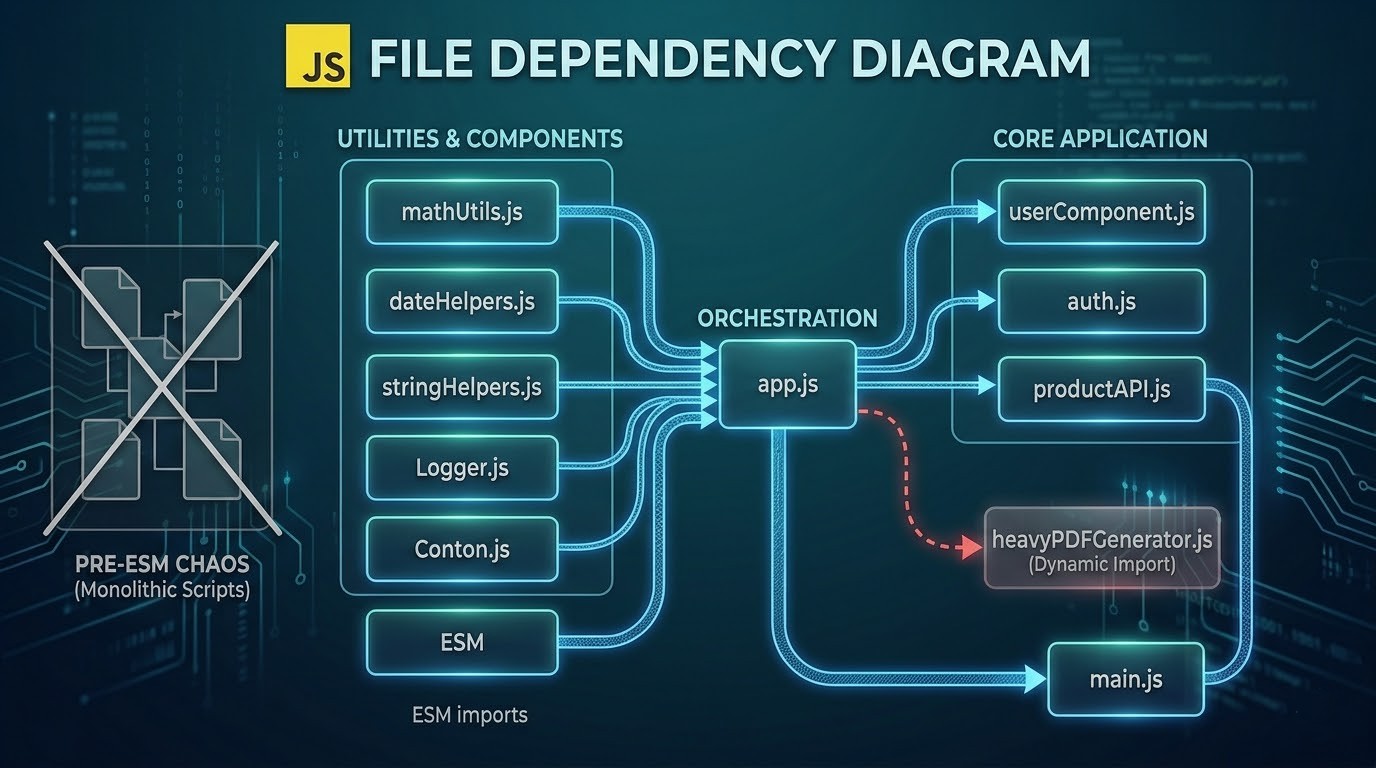
In the early stages of development, it is common to write all code within a single file. For small scripts, this approach may appear sufficient. However, as functionality expands, this structure introduces several challenges.
Consider a simple application that performs multiple tasks:
User authentication
Data processing
UI updates
API communication
If all of this logic resides in one file, the code becomes difficult to navigate. Functions may overlap, variables may conflict, and understanding dependencies becomes increasingly complex.
For example:
function loginUser() {
  // authentication logic
}

function fetchData() {
  // API logic
}

function renderUI() {
  // UI logic
}
While this structure works initially, it lacks clear separation. As more features are added, maintaining such a file becomes impractical.
This is where modules become essential. They allow developers to break large codebases into smaller, focused units, each responsible for a specific task.
Why Modules Are Needed
Modules address several fundamental challenges in software development.
1. Separation of Concerns
Each module can focus on a single responsibility. For example:
auth.jshandles authenticationapi.jsmanages data fetchingui.jscontrols rendering
This separation makes code easier to understand and maintain.
2. Reusability
Functions defined in one module can be reused across different parts of an application without duplication.
3. Maintainability
When code is divided into modules, changes in one module are less likely to affect others. This reduces the risk of unintended side effects.
4. Scalability
Modular codebases scale more effectively as new features are added.
To illustrate this, consider reorganizing the earlier example into modules:
// auth.js
export function loginUser() {
  // authentication logic
}
// api.js
export function fetchData() {
  // API logic
}
// main.js
import { loginUser } from "./auth.js";
import { fetchData } from "./api.js";
This structure improves clarity and modularity significantly.
Exporting Functions or Values
In JavaScript modules, the export keyword is used to make variables, functions, or objects available outside the file in which they are defined.
Named Exports
Named exports allow multiple items to be exported from a single module.
Example:
// math.js
export function add(a, b) {
  return a + b;
}

export function subtract(a, b) {
  return a - b;
}
Here both add and subtract are exported and can be used in other files.
Alternatively, exports can be grouped at the end:
function multiply(a, b) {
  return a * b;
}

function divide(a, b) {
  return a / b;
}

export { multiply, divide };
This approach is useful when organizing multiple exports clearly.
Developers often experiment with such modules by creating a file that exports several utility functions and then importing them into another file. Observing how functions become available across files reinforces the concept of modular sharing.
Importing Modules
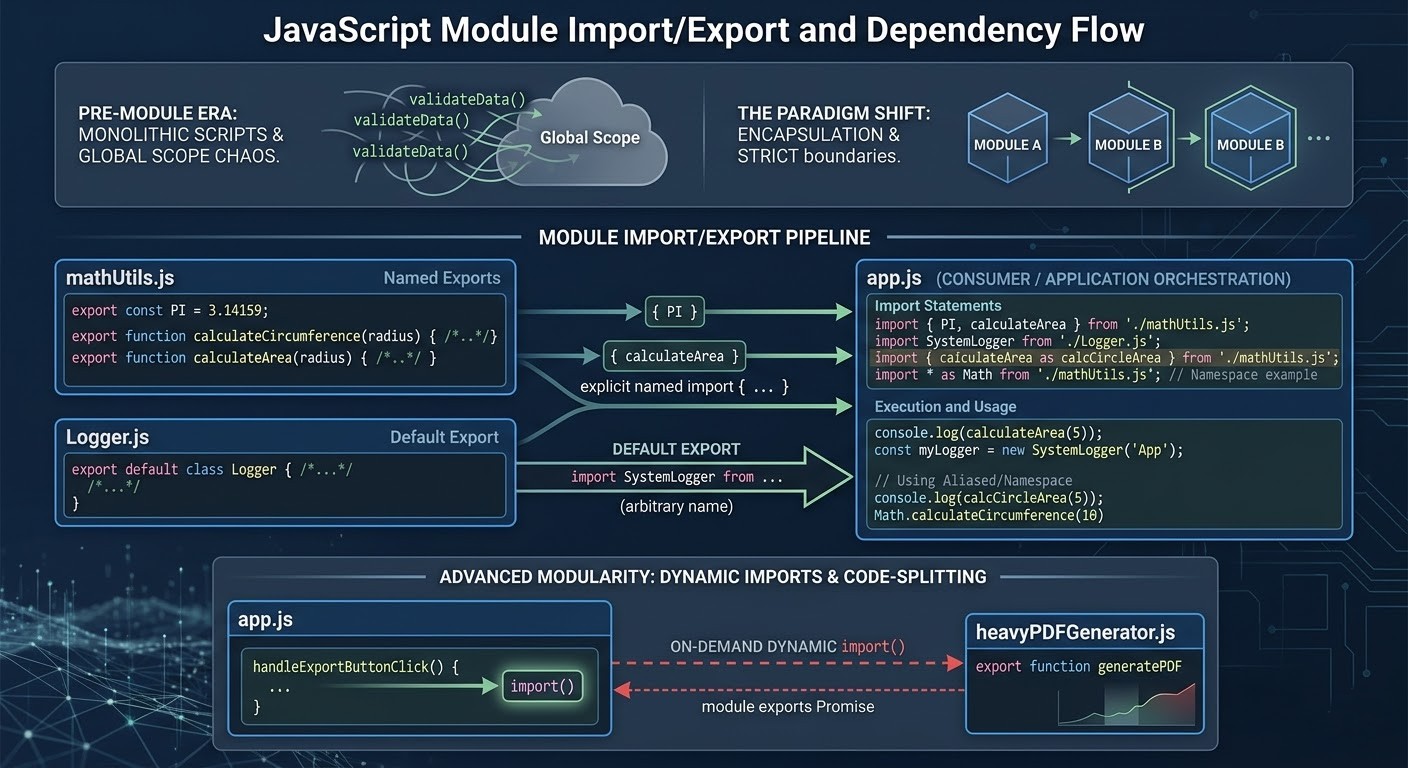
To use exported values from another module, JavaScript provides the import statement.
Importing Named Exports
Example:
import { add, subtract } from "./math.js";

console.log(add(5, 3));
console.log(subtract(10, 4));
Here the names inside curly braces must match the exported names. Named imports provide clarity by explicitly stating what is being used from a module.
Default Exports
In addition to named exports, JavaScript supports default exports. A module can have only one default export.
Example:
// greet.js
export default function greet(name) {
  return "Hello " + name;
}
Importing Default Exports
import greet from "./greet.js";

console.log(greet("Aradhya"));
Unlike named exports, default imports do not require curly braces and can be assigned any name.
This flexibility makes default exports useful when a module primarily exposes a single function or value.
Default vs Named Exports
Understanding the difference between default and named exports is essential for writing clear and consistent code.
| Feature | Named Export | Default Export |
|---|---|---|
| Number per file | Multiple | One |
| Import syntax | Requires {} |
No {} needed |
| Naming | Must match export name | Can use any name |
Example Comparison
Named export:
export function greet() {
  return "Hello";
}
import { greet } from "./file.js";
Default export:
export default function greet() {
  return "Hello";
}
import greetFunction from "./file.js";
In practice, named exports are preferred when a module provides multiple utilities, while default exports are used when a module represents a single primary feature.
Combining Default and Named Exports
A module can include both default and named exports.
Example:
export default function mainFunction() {
  console.log("Main function");
}

export function helperFunction() {
  console.log("Helper function");
}
Importing:
import mainFunction, { helperFunction } from "./module.js";
This pattern is useful when a module has a primary export along with supporting utilities.
Practical Example: Modular Application Design
To better understand modules, consider a simple application that manages student data.
student.js
export function createStudent(name, age) {
  return { name, age };
}
display.js
export function displayStudent(student) {
  console.log(student.name + " is " + student.age + " years old");
}
main.js
import { createStudent } from "./student.js";
import { displayStudent } from "./display.js";

const student = createStudent("Ananya", 21);
displayStudent(student);
This modular structure separates concerns clearly. Each file handles a specific task, making the application easier to maintain and extend.
Developers often practice modular design by creating small projects like this, defining objects and functions in separate files, and then integrating them through imports. Such exercises demonstrate how modules improve clarity and reusability.
Benefits of Modular Code
Modules provide several long-term advantages that make them indispensable in modern development.
1. Improved Readability
Smaller files focused on specific tasks are easier to read and understand than large monolithic scripts.
2. Better Maintainability
Changes in one module do not affect unrelated parts of the application.
3. Code Reusability
Modules can be reused across projects or shared among team members.
4. Easier Testing
Individual modules can be tested independently, improving reliability.
5. Collaboration Efficiency
In team environments, developers can work on separate modules simultaneously without conflicts.
Developing a Modular Mindset
Adopting modules is not just about syntax; it requires a shift in how developers think about code.
Instead of writing long scripts, developers begin to ask:
What responsibility does this piece of code have?
Should it belong in its own module?
Can it be reused elsewhere?
This mindset leads to better architectural decisions and more maintainable systems.
Conclusion
JavaScript modules represent a fundamental advancement in code organization and application design. By allowing developers to split code into independent, reusable units, modules address the challenges of complexity, maintainability, and scalability.
Through the use of export and import, JavaScript enables seamless communication between modules while preserving clear boundaries between different parts of an application. Named and default exports provide flexibility in structuring modules, allowing developers to design systems that are both expressive and efficient.
As applications grow in size, the importance of modular design becomes increasingly evident. Whether working on small projects or large-scale systems, understanding and applying JavaScript modules is essential for writing clean, maintainable, and scalable code.
By practicing modular development through small examples and gradually applying it to larger systems, developers can build a strong foundation that supports long-term software growth and stability.


